


You can compare product prices without opening multiple tabs by using price comparison tools, built-in browser shopping features, or comparison extensions that pull prices from several stores into one view. Instead of manually searching the same item across five or ten websites, these tools detect the product you're viewing and gather prices, shipping costs, and other details automatically. The result is faster decisions, fewer forgotten prices, and a much better chance of finding the real best deal.
If you've ever opened a dozen tabs to check a single pair of headphones, you already know how frustrating manual comparison feels. The good news is that shopping smarter isn't about doing more work. It's about setting up a better system once and letting the tools handle the tedious part quietly in the background.
Why Comparing Prices the Manual Way Wastes So Much Time
Manual price comparison is slow, unreliable, and easy to get wrong because prices constantly change and the same product often appears under slightly different names. When you open Amazon, then a marketplace, then another retailer, you end up juggling half-remembered numbers and trying to figure out which tab showed which price.
The problem goes deeper than just having too many tabs open. Prices fluctuate throughout the day, flash sales appear and disappear, and by the time you've checked several stores, the first one may have already changed. Testing across popular products has shown price differences of around 34% between the cheapest and most expensive store, with some gaps reaching over 300% for the exact same item.
There's also the trap of assuming one big retailer is always cheapest. In reality, the store you expect to win often isn't the lowest, which means checking only one place can leave you overpaying more than half the time. Manual comparison across four or five stores can easily eat up 20 to 40 minutes per product, and that's before you factor in shipping and reviews.
How to Compare Product Prices Without Opening Multiple Tabs
The fastest way to compare product prices without opening multiple tabs is to let a tool detect what you're viewing and gather competing prices for you. Modern browsers, extensions, and comparison apps do the searching in the background, so all the relevant numbers appear in one place instead of scattered across a dozen windows.
Use Your Browser's Built-In Comparison Tools
Many browsers now include shopping features that compare prices without switching tabs. In Chrome, a Tab Compare feature can detect when you have several similar product pages open and pull their specs, prices, ratings, and reviews into one side-by-side summary panel. You don't need to install anything, and you can click any item to jump straight to that tab.
Microsoft Edge takes a similar approach with a Shopping feature accessed through a tag icon in the address bar. It can surface prices from multiple retailers on an item you're already viewing, show price history so you know whether now is a good time to buy, and let you track price drops with notifications when the price falls below a threshold you choose.
These built-in options are convenient because they require no extra setup. Just keep in mind that features like Chrome's Tab Compare currently work on desktop rather than mobile, and they perform best on standard e-commerce product pages.
Try Comparison Extensions and Save-for-Later Tools
Browser extensions are one of the most practical ways to compare prices in real time while you shop. Some extensions automatically detect the product on the page you're visiting, strip out store branding for accuracy, and then run background searches across multiple shopping sources at once, showing you which result has the best price.
Other tools take a save-and-compare approach. Instead of comparing instantly, they let you click to save any item, complete with its title, price, and image, from different websites into a single dashboard. When you've collected the same product from several stores, you open one clean view and sort by price, condition, or seller rating, no spreadsheets or copy-pasting required.
It's worth noting that not every extension is designed for true price comparison. Some popular ones focus mainly on coupons and cashback, which helps you save on an item you've already chosen but doesn't help you compare between stores or products. Choose a tool that matches what you actually need.
Compare the Real Total Cost, Not Just the Sticker Price
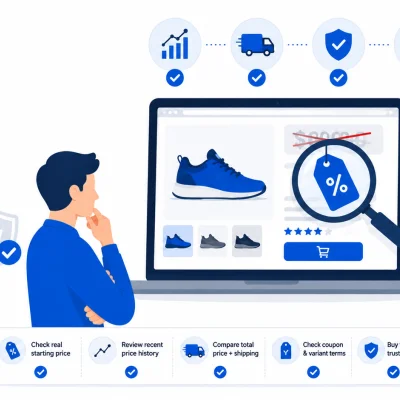
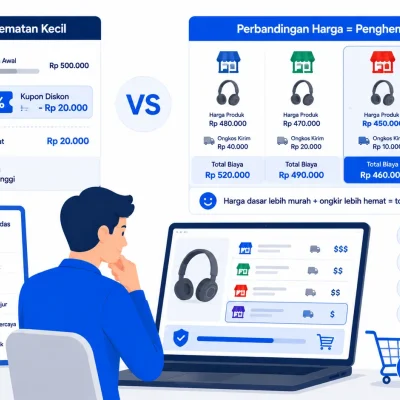
The cheapest number on a product card is not always the best deal, because the true cost includes shipping, delivery speed, return policy, seller reliability, and whether you're even buying the exact version you wanted. Comparing prices without opening multiple tabs only pays off if you're comparing the right numbers.
This matters more than most shoppers realize. A coffee maker might look cheaper on one site simply because it's refurbished. Headphones with the same name might actually be a different generation. One store might advertise a big discount while another quietly sells the same item at its normal, still-lower price. The best price is really the best value once all these factors are accounted for.
Shipping costs are an especially easy thing to overlook. Many quick comparison methods, including some aggregator listings, show only the base price and leave out shipping entirely, which can flip which store is actually cheapest once everything is added up.
This is exactly where a tool like Carikno becomes helpful for shoppers in Indonesia. Carikno compares product prices across Indonesian marketplaces and, whenever the information is available, factors in shipping costs alongside the product price so you see the real total. That means you can spot the genuinely best offer without manually checking listing after listing or lining up browser tabs to do the math yourself.
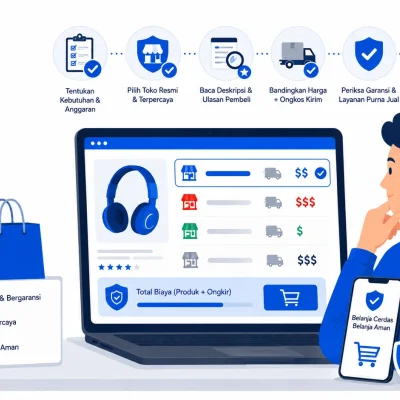
Before you click buy, it helps to run through a quick mental checklist:
Confirm you're looking at the exact model, generation, and condition you want.
Add shipping and any fees to the base price to get the real total.
Check the seller's rating and reliability, not just the price.
Consider delivery speed and return policy.
Compare that final value across a few stores before deciding.
Which Approach Should You Choose?
No single tool is best for every purchase, so the smartest move is to match the method to the situation. A quick everyday buy needs less effort than a big-ticket item where a price gap of hundreds of dollars is on the line.
Here's a simple way to think about it:
For messier, more personal searches, AI assistants are especially useful because they can refine results with follow-up questions and pull options across multiple retailers. For exact-model purchases, a comparison tool that shows true total cost will usually get you to a decision faster.
You don't have to commit to just one tool forever, either. Many shoppers keep a browser feature enabled for casual checks and reach for a dedicated comparison platform when they're making a purchase that really matters.
Shop Smarter, Not Harder
Learning how to compare product prices without opening multiple tabs comes down to trading manual effort for a smarter system. Whether you use a browser's built-in shopping tools, a comparison extension, a save-for-later dashboard, or a marketplace-focused platform like Carikno for Indonesian shopping, the goal is the same: see the real total cost in one clean view and buy with confidence.
Set up your preferred tool once, keep the total-cost mindset in the back of your mind, and you'll stop drowning in tabs, stop second-guessing whether it was cheaper somewhere else, and start consistently finding the best value for your money.
Leave a Comment